
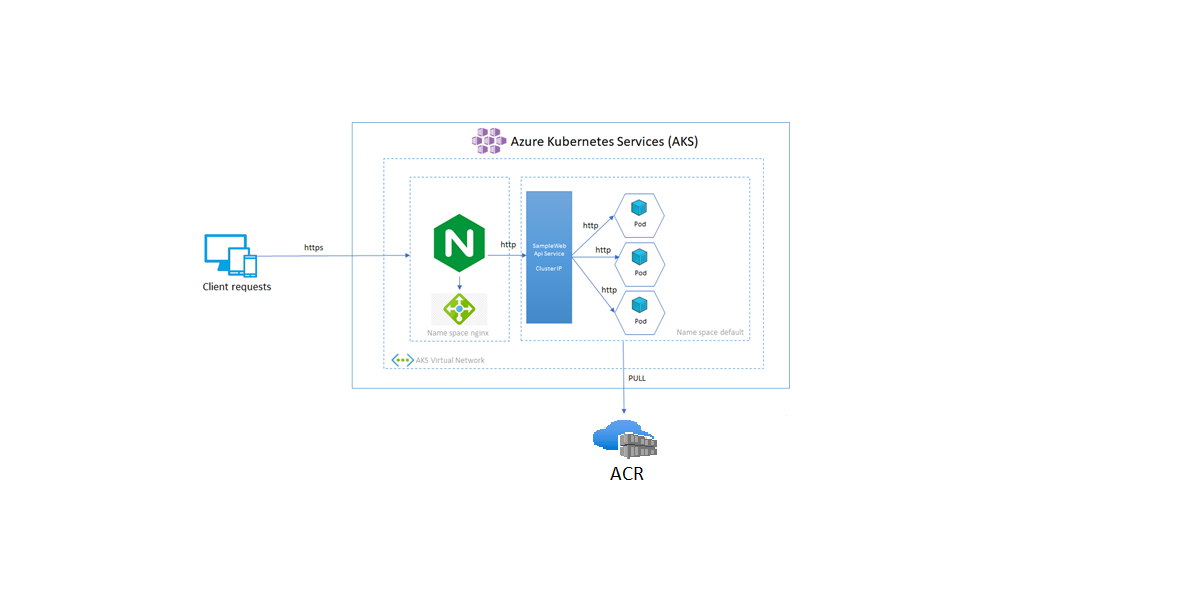
We previously looked at how to configure an ingress controller for the Azure Kubernetes Service (AKS) using TLS/SSL. In this section, we’ll look at how to construct an Azure container registry using Terraform and how to utilize it in our deployment. We’ll also look at some of the benefits of an acr :
– Ability to find, pull, and push Docker images
– Integration with other Azure services
– Built-in security features
– Role-based access control
– Image signing
This article is a part of a series:
- Part 1 : How to setup nginx reverse proxy for aspnet core apps with and without Docker compose
- Part 2 :How to setup nginx reverse proxy && load balancer for aspnet core apps with Docker and azure kubernetes service
- Part 3 : How to configure an ingress controller using TLS/SSL for the Azure Kubernetes Service (AKS)
- Part 4 : switch to Azure Container Registry from Docker Hub
- Part 5: Using Azure DevOps, Automate Your CI/CD Pipeline and Your Deployments
- Part 6 : Using Github, Automate Your CI/CD Pipeline and Your Deployments
- Part 7 : Possible methods to reduce your costs
Part 1 : Creating Azure container registry (ACR)
The first step is to set up the Azure container registry and ensure that it is connected to our Kubernetes cluster.
Terrafrom Block to create the acr :
resource "azurerm_container_registry" "acr001" {
  name                = "containerRegistryachraf"
  resource_group_name = azurerm_resource_group.rg.name
  location            = azurerm_resource_group.rg.location
  sku                 = "Standard"
}


resource "azurerm_role_assignment" "roleforaks" {
  principal_id                     = azurerm_kubernetes_cluster.cluster.kubelet_identity[0].object_id
  role_definition_name             = "AcrPull"
  scope                            = azurerm_container_registry.acr001.id
  skip_service_principal_aad_check = true
}
Now that we have added this block to our infrastructure, acr will be ready to use, but first we must deploy an application to our repository. To do this, we will take the same dotnet application and simply add the word “acr” to the index page.
Part 2 : Deploying to ACR
Install Docker first, then create a fresh copy of our application to test out the Azure Container Registry.
To access your container registry, use the following command:
docker login containerregistryname.azurecr.io.
Next, let’s tag and push our image:
docker tag hello-world containerregistryname.azurecr.io/hello-world
docker push containerregistryname.azurecr.io/hello-world
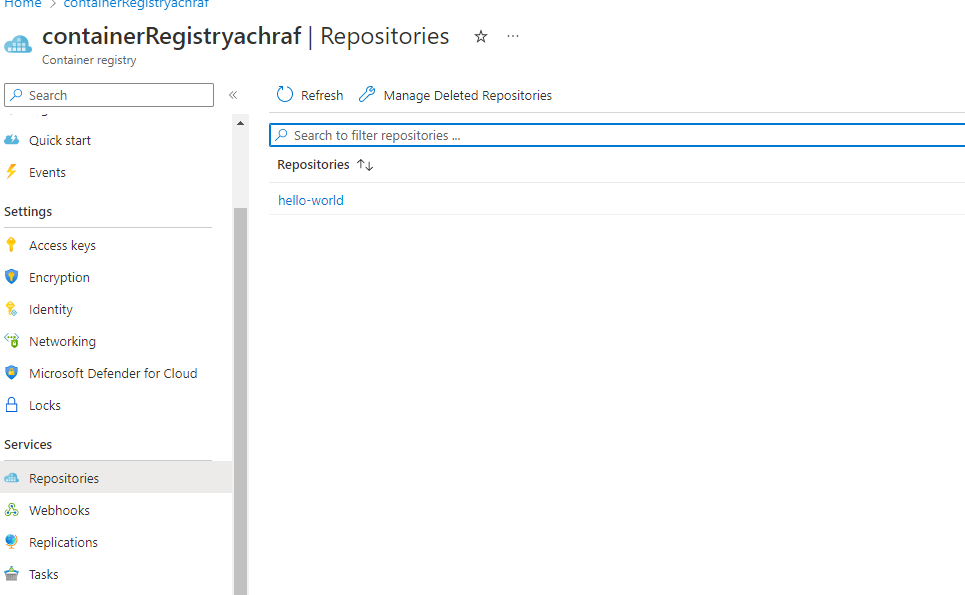
once we deployed our application it will look like the below image inside ACR :

Part 3: Create our deployment and updating our ingress
In this part, we are creating a new deployment as we are adding a new application :
apiVersion: apps/v1
kind: Deployment
metadata:
  name: backend-restapp-acr
  namespace: ingress
  labels:
    app: backend-restapp-acr
    tier: backend
spec:
  replicas: 2
  selector:
    matchLabels:
      app: backend-restapp-acr
  template:
    metadata:
      labels:
        app: backend-restapp-acr
        tier: backend
    spec:
      containers:
        - name: backend-restapp-acr
          image: containerregistryachraf.azurecr.io/hello-world:latest
          ports:
            - containerPort: 5000
---
apiVersion: v1
kind: Service
metadata:
  name: my-backend-serviceacr ## VERY VERY IMPORTANT - NGINX PROXYPASS needs this name
  labels:
    app: backend-restapp-acr
    tier: backend
spec:
  selector:
    app: backend-restapp-acr
  ports:
    - name: http
      port: 5000 # ClusterIP Service Port
      targetPort: 5000 # Container Port
  type: ClusterIP
using the following commands, you can deploy our application:
kubectl apply -f 01-backend-acr-deployment.yml
Great , now if we try to check our services using :
kubectl get services --namespace ingress
we will get a new service in our list :
Also , if we check our deployements :kubectl get deployments --namespace ingress
Now let’s update our ingress with our new app :
apiVersion: networking.k8s.io/v1
kind: Ingress
metadata:
  name: webapp-ingress
  namespace: ingress
  annotations:
    nginx.ingress.kubernetes.io/ssl-redirect: "false"
    nginx.ingress.kubernetes.io/use-regex: "true"
    nginx.ingress.kubernetes.io/rewrite-target: /$1
spec:
  ingressClassName: nginx
  rules:
  - http:
      paths:
      - backend:
          service:
            name: my-backend-service
            port:
              number: 5000
        path: /
        pathType: Prefix
      - backend:
          service:
            name: my-backend-serviceacr
            port:
              number: 5000
        path: /acr(/|$)(.*)
        pathType: Prefix
      - backend:
          service:
            name: my-nginx-service-01
            port:
              number: 80
        path: /webapp1(/|$)(.*)
        pathType: Prefix
      - backend:
          service:
            name: my-nginx-service-02
            port:
              number: 80
        path: /webapp2(/|$)(.*)
        pathType: Prefix
      - backend:
          service:
            name: my-nginx-service-03
            port:
              number: 80
        path: /webapp3(/|$)(.*)
        pathType: Prefix
  - host: yourdomaine.com # change the IP address here
    http:
      paths:
      - backend:
          service:
            name: my-backend-service
            port:
              number: 5000
        path: /
        pathType: Prefix
      - backend:
          service:
            name: my-backend-serviceacr
            port:
              number: 5000
        path: /acr
        pathType: Prefix
      - backend:
          service:
            name: my-nginx-service-01
            port:
              number: 80
        path: /webapp1
        pathType: Prefix
      - backend:
          service:
            name: my-nginx-service-02
            port:
              number: 80
        path: /webapp2
        pathType: Prefix
      - backend:
          service:
            name: my-nginx-service-03
            port:
              number: 80
        path: /webapp3
        pathType: Prefix
Let’s deploy and see the results :
kubectl apply -f app-ingress.yml
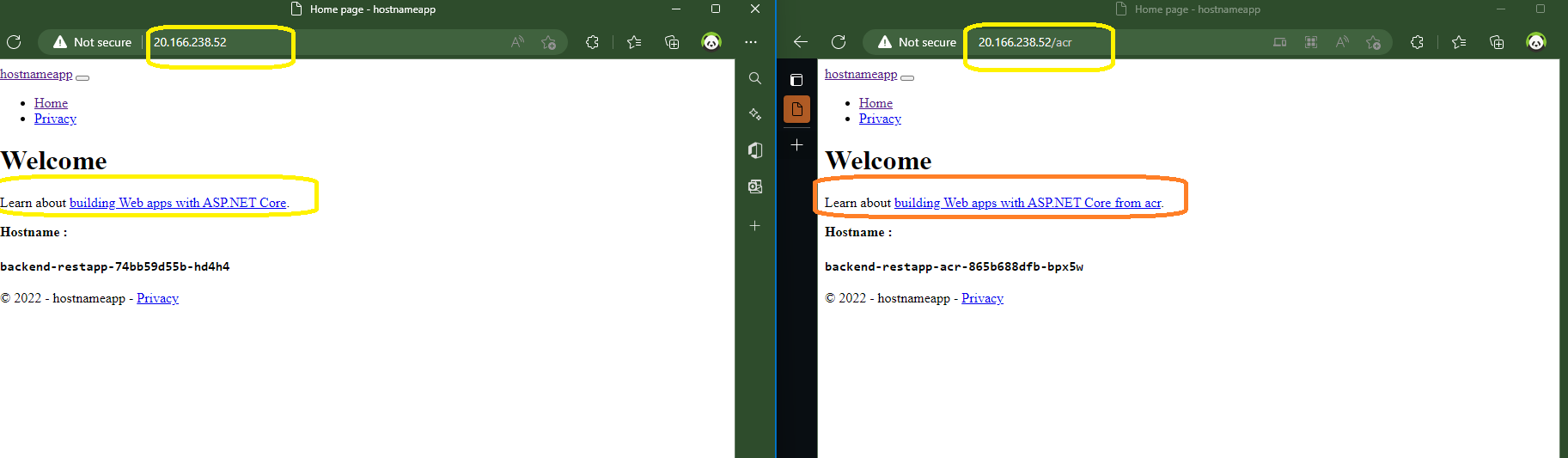
Now if we visit the url of our ingress using the /acr prefix that we have created we should find the new deployment that we have added :
Hope this was helpful ^^






















Comments 1