I Let Five AI Agents Build My App. Here’s Exactly What Happened.
We’ve been talking about “AI agents” for over a year now. Every demo is the same: a single model, a long chat, some tool calls. It works. But it doesn’t scale. It doesn’t parallelise. And it doesn’t assign the right brain to the right job.
I’ve been thinking about this problem for a while. Then I watched Burke Holland’s video (https://www.youtube.com/watch?v=-BhfcPseWFQ) and something clicked.
The answer isn’t one smarter agent. It’s Five focused ones.
What Orchestration Actually Means
Here’s where most explanations fall apart: they use jargon that doesn’t connect to anything real. “Orchestration,” “agentic workflows,” “multi-modal pipelines.” Great. What does any of that look like in a real project?
Let me give you a concrete model.
You’re building a feature. Normally, you’d prompt Copilot: “Add a filter bar to the task list.” One model handles everything it plans, writes logic, styles components, checks imports. It does it sequentially, often forgetting context from six steps back.
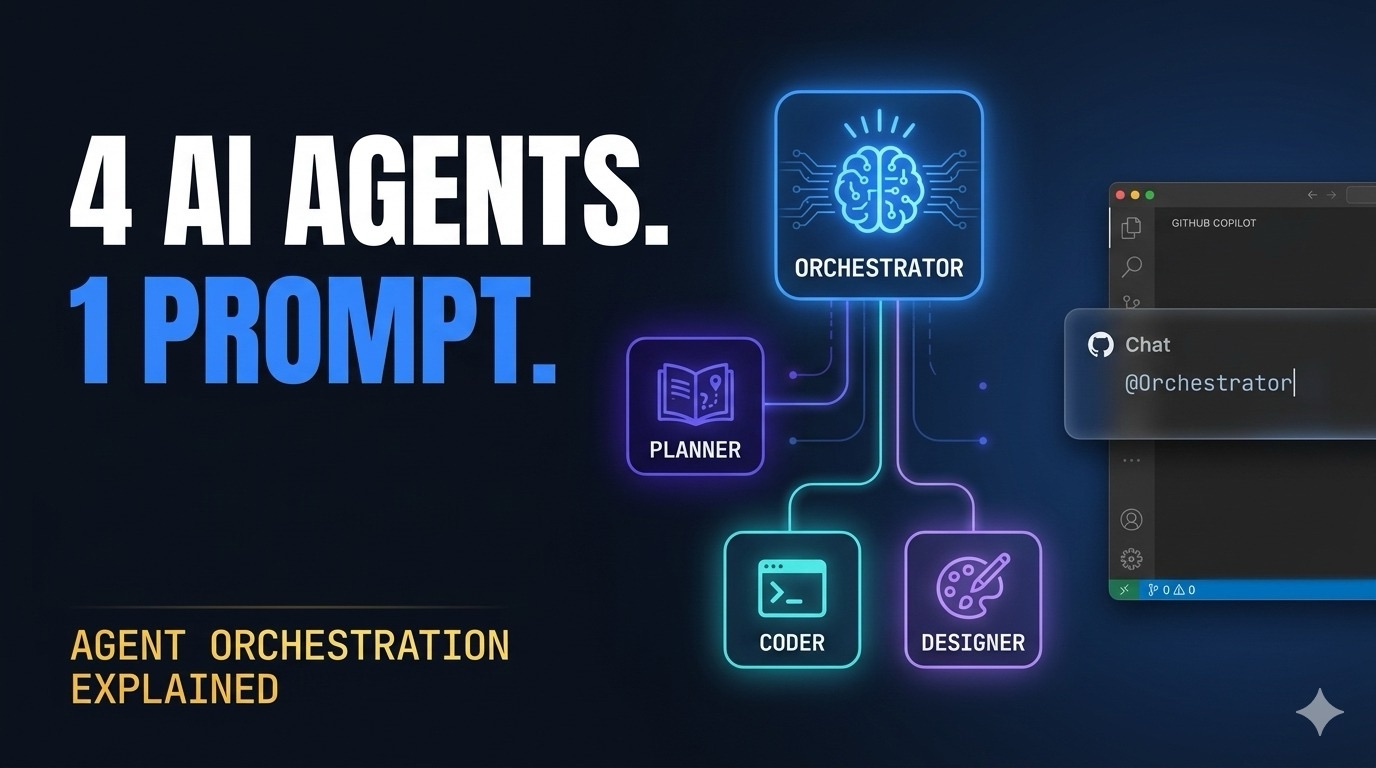
With orchestration, the same request goes to a coordinator. That coordinator doesn’t write a single line of code. Instead it does three things:
1. Calls a Planner to research your codebase and produce a step-by-step implementation plan, with explicit file assignments
2. Identifies which tasks have no file conflicts those run in parallel
3. Hands scoped tasks to specialist agents a Coder for logic, a Designer for UI with clear ownership
The result: two agents working simultaneously on different files, each doing only what they’re best at. No one steps on anyone’s toes. No context bloat. No mixing concerns.
That’s it. That’s orchestration.
The Ultralight Pattern
Burke Holland built something called Ultralight : https://burkeholland.github.io/ultralight a Five-agent setup for VS Code and GitHub Copilot that makes this concrete:
| Agent | Model | Job |

|-------|-------|-----|

| Orchestrator | Claude Sonnet 4.6 | Coordinates. Never implements. |

| Planner | Claude Opus 4.6 | Researches your codebase. Builds the plan. Assigns files. |

| Coder | GPT-5.3-Codex | Writes production code. Scoped to its file list. |

| Designer | Claude Opus 4.6 | Owns all UI/UX. Colors, spacing, layout, component styling. |
The model choices aren’t random. Claude Opus thinks deeply use it for planning and design decisions that require understanding context. Codex generates code fast and accurately use it for implementation. Sonnet balances speed and intelligence use it to coordinate without wasting compute on a task that’s purely management.
Right model. Right job.
The Mechanic That Makes It Work
Here’s what I find genuinely clever about this pattern: file ownership.
The Planner doesn’t just produce a list of steps. It assigns every file to exactly one agent for each phase. Two agents can work in parallel only if their file lists don’t overlap. The moment they’d need to touch the same file, the Orchestrator makes them sequential.
This solves a real problem. Most “parallel agent” demos don’t account for race conditions. Two agents trying to modify `App.tsx` at the same time produces garbage or worse, one silently overwrites the other’s work.
Ultralight’s answer is strict: one file, one agent, one phase. Period.
I built a demo to make this visible. A React task manager the full code is here : https://github.com/achrafbenalaya/ultralight-agent-orchestration-demo where every `.jsx` file is Coder territory and every `.css` file is Designer territory. They never cross. The comments in each file even say who owns it.
```jsx

// Coder owns: TaskItem.jsx

// Designer owns: TaskItem.module.css

```
That ownership comment is the whole pattern in two lines.
What I Actually Tested
I ran the orchestrator on a real extension request: “Add priority filtering (All / High / Medium / Low) to the task list. Mobile-friendly. Match the existing design system.”
Here’s the rough sequence of what happened:
1. Planner took about 45 seconds It read the existing component structure, identified all files it would need to touch, and returned a two-phase plan. Phase 1: Coder adds filter state to `App.jsx` and filter props to `TaskList.jsx`. Phase 2 (parallel): Coder adds filter buttons to a new `FilterBar.jsx`, Designer styles `FilterBar.module.css` and updates `global.css` with new tokens.
2. Orchestrator identified zero conflicts in Phase 2. `FilterBar.jsx` (Coder) and `FilterBar.module.css` + `global.css` (Designer) separate files. Both spawn.
3. Both agents finished in roughly the same window. The Designer used the existing CSS variable system rather than hardcoding values. The Coder added a controlled filter state with a `useState` that defaults to `”all”`.
4. The integration step (Phase 3) was ten lines. Orchestrator gave it back to Coder for wiring: import `FilterBar`, pass `activeFilter` and `setActiveFilter` as props to `TaskList`.
Total prompt-to-working-feature time: under 4 minutes.
That’s not because the models are faster. It’s because the work ran in parallel and there was zero back-and-forth context repair.
The Part People Get Wrong
Every time I demo this to teams, they ask the same question: “Why not just use one model and have it do everything?”
Two reasons.
First, single-model sequential output doesn’t scale with complexity. Ask one model to redesign a component and refactor its API at the same time. It’ll drop one of those tasks, or conflate them in ways that require manual cleanup. Specialists avoid that.
Second, this is how engineering teams actually work. You don’t ask your backend lead to write the CSS. You don’t ask your UI designer to architect the data layer. Roles exist because specialisation produces better output than generalism at every level of complexity above “Hello World.”
Agents are the same. Give one model too many concerns and it optimises for the average of all of them. Give it one responsibility and it excels.
Setting This Up in Your Own Project
You need VS Code with GitHub Copilot (any tier), plus two settings:
```json

{

  "chat.plugins.enabled": true,

  "chat.subagents.allowInvocationsFromSubagents": true

}

```
Then install the plugin from Burke’s repo directly via the Command Palette:
`⌘⇧P` → Chat: Install Plugin From Source → paste `https://github.com/burkeholland/ultralight`
All Five agents install in one shot.
After that, you just tag the Orchestrator:
“`
@Orchestrator [your feature request]
“`
It calls the Planner first. You don’t need to manage the rest the Orchestrator handles delegation and parallelism automatically.
One thing worth noting: the Coder agent uses [Context7](https://context7.com), an MCP server that fetches live documentation for any library. This matters because GPT-5.3-Codex’s training data is already stale on some APIs. Context7 keeps it honest.
Why This Matters for DevSecOps and Enterprise Teams
I work in enterprise cloud environments Azure,GCP,kube,dev AKS, GitHub Actions, Terraform… The pattern applies there too.
Think about an IaC pipeline change: you need a Bicep module update, a GitHub Actions workflow change, and a documentation update. Normally you’d prompt an agent sequentially for each. With orchestration:
– Planner identifies which files each task owns
– IaC agent handles the Bicep module
– CI/CD agent handles the workflow
– Docs agent updates the README
All three in parallel, scoped to non-overlapping files.
The Planner’s file conflict detection is the safety net. You get parallelism without the chaos of concurrent writes.
What’s Next
Ultralight is intentionally minimal. Five agents, one coordination pattern, zero overhead. That’s the point.
Where I see this going:
More specialised models. We’re already seeing model differentiation reasoning models for planning, fast code-gen models for implementation. The agent definitions just need to be updated as new models drop.
Cross-IDE portability.The `.agent.md` format is VS Code-specific today. Same pattern works anywhere that supports subagent invocation.
Security and compliance layers. For enterprise, add a fifth agent a Security Reviewer that runs after Coder and before the Orchestrator closes the task. It scans changed files for secrets, insecure patterns, and policy violations. The Planner assigns it to run sequentially after all coding phases (I will be adding a new agent in another post).
The Code
Everything I described is in this repo: all five agent definition files, the full demo React app with proper file ownership separation, VS Code settings, and the Context7 MCP configuration.
Clone it, install the agents, drop a feature request to `@Orchestrator`, and watch five models work together.
```bash

git clone https://github.com/achrafbenalaya/copilot-Orchestratio

cd copilot-Orchestratio

npm install && npm run dev

```
The demo app is live at `localhost:3000`. The agents are ready to extend it.
Questions or feedback? Find me on LinkedIn : https://www.linkedin.com/in/achrafbenalaya/ or YouTube: https://www.youtube.com/c/AchrafBenAlaya. I post regularly about Azure, DevSecOps,copilot,(soon gcp too), and AI integration in enterprise environments.
References:
- – Ultralight Orchestration Burke Holland : https://gist.github.com/burkeholland/0e68481f96e94bbb98134fa6efd00436
- – Ultralight Official Site : https://burkeholland.github.io/ultralight/
- – Repo github : achrafbenalaya/copilot-Orchestration