Achraf Ben Alaya
No Result
View All Result
  • Home
  • News
  • Blog
    • blazor
    • c#
    • Cloud
      • Azure
    • docker
    • sql
    • xamarin
    • Dapr
    • Tricks, Tips and Fixes
    • General Tips & Fix
  • AI
  • Cloud
  • Motivation
  • Courses
  • About
    • Resume
    • Privacy Policy
SUBSCRIBE
  • Home
  • News
  • Blog
    • blazor
    • c#
    • Cloud
      • Azure
    • docker
    • sql
    • xamarin
    • Dapr
    • Tricks, Tips and Fixes
    • General Tips & Fix
  • AI
  • Cloud
  • Motivation
  • Courses
  • About
    • Resume
    • Privacy Policy
No Result
View All Result
Achraf Ben Alaya
No Result
View All Result
ADVERTISEMENT
Home Blog Cloud Azure

Dealing with Stuck ‘Signing Out’ Screens on Azure Windows Servers

achraf by achraf
August 5, 2024
in Azure, Blog, Cloud, Tricks, Tips and Fixes
2 min read
0
Dealing with Stuck ‘Signing Out’ Screens on Azure Windows Servers
0
SHARES
907
VIEWS
Share on FacebookShare on Twitter

In this article, we’ll explore effective solutions for addressing a common issue encountered with Windows servers on Microsoft Azure: sessions getting stuck on the “Signing Out” screen. We will provide step-by-step instructions on how to resolve this problem without the need to reboot the virtual machine, ensuring minimal disruption and maintaining server availability. Our guide is designed to help you quickly regain access and functionality, even when traditional methods fail.

Solution

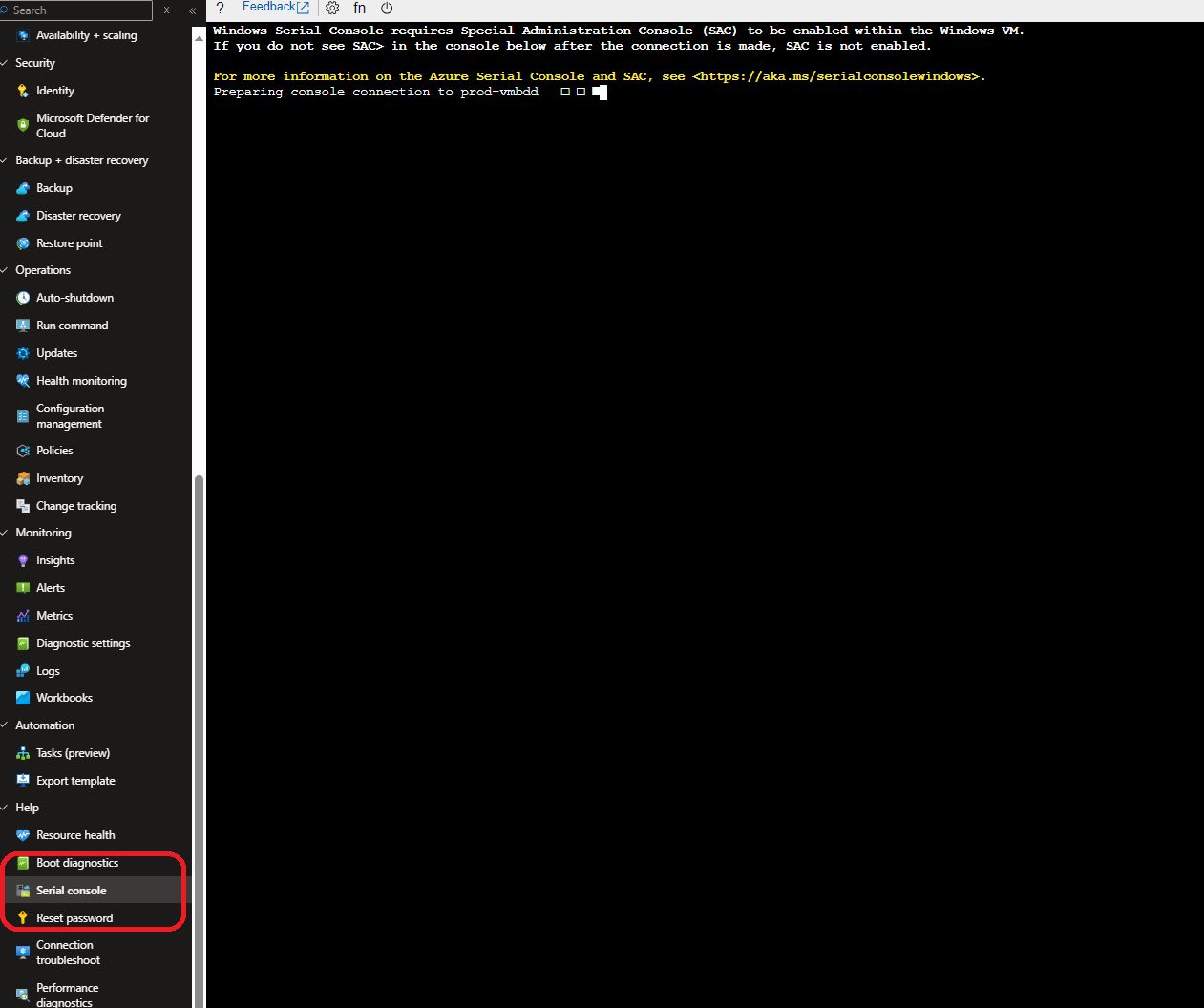
Prerequisites : Boot diagnostics must be enabled for the instance  .

  1. Accessing Windows Server Serial console:
  2.  Once the console is connected, you will get the SAC prompt.
    ```
    Computer is booting, SAC started and initialized.
    Use the "ch -?" command for information about using channels.
    Use the "?" command for general help.
    
    ```
    ```
    SAC>
    EVENT: The CMD command is now available.
    SAC>
    
    ```
  3. Type “cmd” to create the to the server console channel.
    SAC>cmd
    The Command Prompt session was successfully launched.
    SAC>
    EVENT:   A new channel has been created.  Use "ch -?" for channel help.
    Channel: Cmd0001
    SAC>
  4. Use the channel number to connect to the instance console. Use command “ch -si 1” and press Enter.
    SAC> ch -si 1
     Name:                  Cmd0001
     Description:           Command
     Type:                  VT-UTF8
     Channel GUID:          e7f52da4-203b-11ea-a80f-000d3a7b44b4
     Application Type GUID: 63d02271-8aa4-11d5-bccf-00b0d014a2d0
     Press  for next channel.
     Press 0 to return to the SAC channel.
     Use any other key to view this channel.


  5. Enter the windows instance user credentials to access windows command prompt.
    Please enter login credentials.
    Username: lingesh
    Domain  :
    Password:


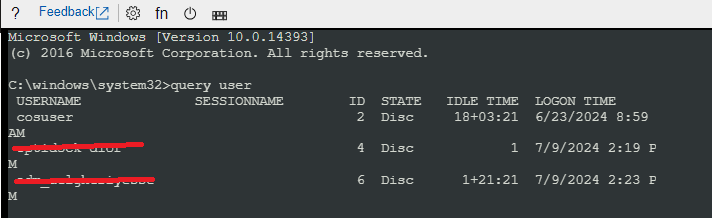
  6. Once you have authenticated successfully, you will get windows command prompt like below.
  7. Run the Command to See Connected Users
    query user

  8. Log off the stuck session:
    logoff <session_id>

    Example : logoff  4

    And like that when you try again to connect to  RDP , you will find that the issue is resolved .
ShareTweet
Previous Post

Azure Elastic Job Tutorial: Automate Your SQL Jobs Efficiently

Next Post

Automated Monitoring of Azure App Registration Secrets with Automation Accounts and Logic Apps

Related Posts

Azure

My Fourth Year as a Microsoft MVP: From Student Partner to AI Empowerment

July 19, 2026
6
AI

I tried GitHub Spec Kit : An Honest Field Report

June 28, 2026
470
AI

I Let Five-AI Agents Build My App. Here’s Exactly What Happened.

May 20, 2026
76
AI

GitHub Copilot Skills for Terraform: 5 On-Demand AI Assistants for Azure Container Apps

March 29, 2026
268
Azure

From Terraform to Autopilot: AI-Assisted Automation for Azure Container Apps  Part 3

March 29, 2026
1.6k
Azure

Building a Microservices Architecture on Azure Container Apps with Terraform Part 2

March 1, 2026
241
Next Post
Automated Monitoring of Azure App Registration Secrets with Automation Accounts and Logic Apps

Automated Monitoring of Azure App Registration Secrets with Automation Accounts and Logic Apps

Leave a Reply Cancel reply

Your email address will not be published. Required fields are marked *

Terraform

Certifications

Microsoft certified trainer (MCT)

Recommended

The easiest way to deploy a website to Azure with Azure App Service

The easiest way to deploy a website to Azure with Azure App Service

April 21, 2020
773
Reflecting on My Journey as a Microsoft MVP in 2024

Reflecting on My Journey as a Microsoft MVP in 2024

March 24, 2024
432
Dealing with Stuck ‘Signing Out’ Screens on Azure Windows Servers

Dealing with Stuck ‘Signing Out’ Screens on Azure Windows Servers

August 5, 2024
907
How to SSH into AKS Nodes

How to SSH into AKS Nodes

May 11, 2021
8k
Sql tips and tricks

Sql tips

August 29, 2020
734
Migrate and modernize your applications on Azure

Migrate and modernize your applications on Azure – Part 2.0 (Proxy Function)

April 3, 2021
1.3k
Facebook Twitter LinkedIn Youtube

My Fourth Year as a Microsoft MVP: From Student Partner to AI Empowerment

July 19, 2026

I tried GitHub Spec Kit : An Honest Field Report

June 28, 2026

I Let Five-AI Agents Build My App. Here’s Exactly What Happened.

May 20, 2026

Categories

  • AI (6)
  • Apps (1)
  • Azure (71)
  • blazor (2)
  • Blog (100)
  • c# (7)
  • Cloud (72)
  • copilot (4)
  • Courses (4)
  • Dapr (4)
  • docker (4)
  • Games (1)
  • General Tips & Fix (1)
  • Home (1)
  • Kubernetes Service (AKS) (1)
  • Motivation (3)
  • motivation (2)
  • News (9)
  • Resume (1)
  • sql (4)
  • Terrafrom (2)
  • Tricks, Tips and Fixes (4)
  • xamarin (5)
No Result
View All Result
  • Home
  • News
  • Blog
    • blazor
    • c#
    • Cloud
      • Azure
    • docker
    • sql
    • xamarin
    • Dapr
    • Tricks, Tips and Fixes
    • General Tips & Fix
  • AI
  • Cloud
  • Motivation
  • Courses
  • About
    • Resume
    • Privacy Policy