I spent a session building a complete document upload and management feature into an existing Blazor Server dashboard app using GitHub Spec Kit and an AI coding agent. This is my unfiltered write-up: what Spec Kit is, what went well, what didn’t, and the practical numbers (model, rough token cost) behind it. (this is my first try , i will keep using it for the next 30 days and give another full 3à days feedback )
What I Was Building
The project “ContosoDashboard” is a .NET 10 / Blazor Server training app with EF Core on SQL Server, mock cookie auth, and role-based policies (Employee, TeamLead, ProjectManager, Administrator). The goal was to bolt on a full document management feature:
- Upload files with metadata, validation, and a progress animation
- Browse, filter, sort, and search documents
- Download and in-browser preview (PDF/images)
- Share documents with other users + notifications
- Attach documents to tasks and projects
- An admin-only audit log and usage report
Nothing exotic, but it touches the data layer, services, controllers, Razor pages, navigation, and CSS a realistic vertical slice.
What Spec Kit Actually Is
Spec Kit pushes a spec-driven development workflow. Instead of jumping straight to code, you move through a sequence of phases, each backed by a slash command:
/speckit.constitution– establish project principles (security by default, layered architecture, YAGNI, incremental delivery)./speckit.specify– turn a stakeholder doc into a formal spec with user stories and acceptance criteria./speckit.clarify– surface and resolve ambiguities before planning./speckit.plan– produce a technical plan: data model, contracts, structure decisions./speckit.tasks– break the plan into a numbered, dependency-ordered task list./speckit.implement– execute the tasks./speckit.converge– compare the running implementation against the spec, find gaps, and fix them.
What Went Well
The plan-to-tasks decomposition was genuinely good. Fifty tasks (T001–T050), grouped by user story and ordered by dependency, with explicit file paths in each task. Because every task named its target file, execution rarely got lost. The models came first, then services, then UI exactly the layered order you’d want.
Incremental, independently-testable stories. Each user story (P1–P9) was a checkpoint. Upload (the MVP) landed first; everything else built on it. If I’d run out of time at story 5, I’d still have had a coherent, shippable subset.
Security showed up by default. Files stored outside wwwroot, GUID-based filenames, an IFileStorageService abstraction for a future Azure swap, authorization checks at the service layer, and [Authorize] on every new page and controller. That came straight out of the constitution phase rather than being bolted on later.
The converge phase earned its keep. More on this below it’s where Spec Kit’s structure paid off when things broke.
What Did NOT Go Well
Here’s the honest part.
1. EnsureCreated() silently skipped my new tables. The app initializes its schema with context.Database.EnsureCreated(). That call only creates the database if it doesn’t already exist it does not add new tables to an existing one. So after implementing everything and getting a clean build, the first page load threw:
SqlException: Invalid object name 'Documents'.The code was correct. The database was stale. No migration step existed, and nothing in the task list flagged that gap. The build passing gave a false sense of “done.” A green build is not a running app.
2. fix-up SQL didn’t match the model. To patch the missing tables without introducing EF migrations, I added idempotent CREATE TABLE IF NOT EXISTS SQL at startup. Then I got a second runtime error:
SqlException: Invalid column name 'UpdatedDate'.the DDL drifted from the actual C# model LastModifiedDate instead of UpdatedDate , the agent should have used EF Core migrations from the start instead of EnsureCreated().
3. A first pass at download logging was wrong. the app was not working at all and i had SqlException: Invalid column name ‘UpdatedDate’ + SqlException: Invalid object name ‘Documents’. and i asked the /speckit.converge to analyse and fix it .
How Converge Saved Me
Both database errors were caught and fixed through /speckit.converge. The flow was: paste the runtime exception → the agent compares the implementation against the spec, plan, and tasks → it identifies the gap → appends a new numbered task (T051, T052) to tasks.md → fixes the code. The task list stayed honest about what was actually wrong, not just what was originally planned. That closed loop between “here’s the error” and “here’s the traceable fix” is the workflow’s strongest feature.
The Numbers: Model and Token Cost
- Model used: Claude Opus 4.6, driving the agent inside VS Code.
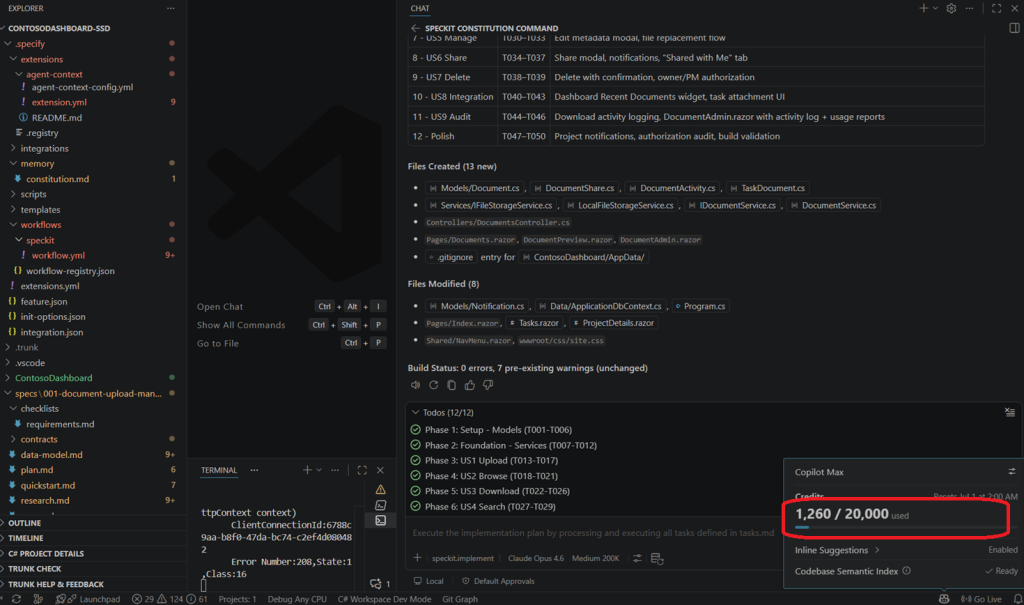
- Scope: ~13 new files and ~8 modified files, 50 planned tasks plus 2 convergence tasks, several full-file Razor pages (some 300+ lines), and multiple build/verify cycles.
- Token usage: Since i was on 0 % while i started , i used almost 7 % from my token usage presnted below by the number of tokens
Would I Use Spec Kit Again?
Short Answer YES and Now , i’m still testing .
my feeling is its md files little overwhelmed.., reading and going through each of them looks little boring and really too much.
For now i see Spec Kit is useful for non-core developers or technical product people building prototypes, because it documents decisions, context, specs, and tradeoffs better than pure vibe coding.
For experienced developers on familiar projects, it can slow things down; its best use is for unclear domains or complex features where guided discovery helps uncover risks and better solutions.
I will keep testing for the next 30 days and we will see if i change my mind and i will share in a new blog post or maybe a youtube video .
Thanks for reading .