Achraf Ben Alaya
No Result
View All Result
  • Home
  • News
  • Blog
    • blazor
    • c#
    • Cloud
      • Azure
    • docker
    • sql
    • xamarin
    • Dapr
    • Tricks, Tips and Fixes
    • General Tips & Fix
  • AI
  • Cloud
  • Motivation
  • Courses
  • About
    • Resume
    • Privacy Policy
SUBSCRIBE
  • Home
  • News
  • Blog
    • blazor
    • c#
    • Cloud
      • Azure
    • docker
    • sql
    • xamarin
    • Dapr
    • Tricks, Tips and Fixes
    • General Tips & Fix
  • AI
  • Cloud
  • Motivation
  • Courses
  • About
    • Resume
    • Privacy Policy
No Result
View All Result
Achraf Ben Alaya
No Result
View All Result
ADVERTISEMENT
Home Blog

Azure Static Web App Service

achraf by achraf
September 27, 2020
in Blog, News
3 min read
0
Azure Static Web App Service
0
SHARES
1.2k
VIEWS
Share on FacebookShare on Twitter

What you can do with Static Web Apps

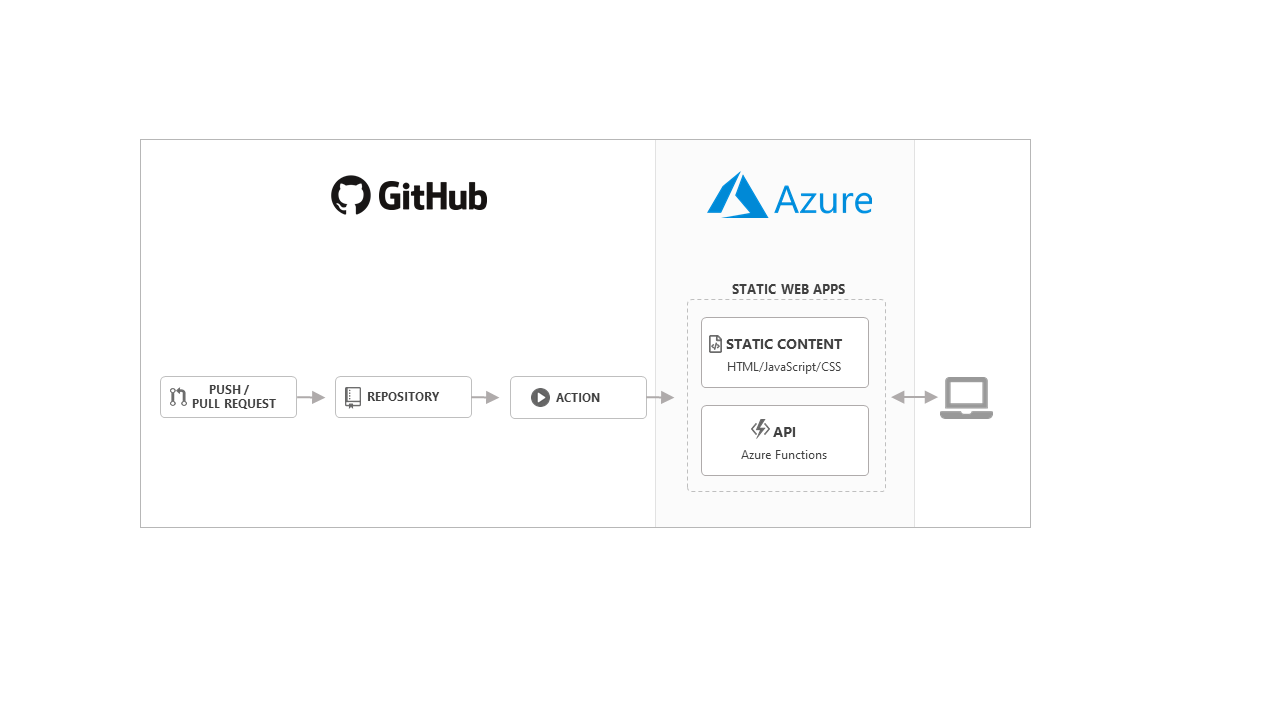
Azure Static Web Apps is a service that automatically builds and deploys full stack web apps to Azure from a GitHub repository.
When you create an Azure Static Web Apps resource, Azure sets up a GitHub Actions workflow in the app’s source code repository that monitors a branch of your choice. Every time you push commits or accept pull requests into the watched branch, the GitHub Action automatically builds and deploys your app and its API to Azure.

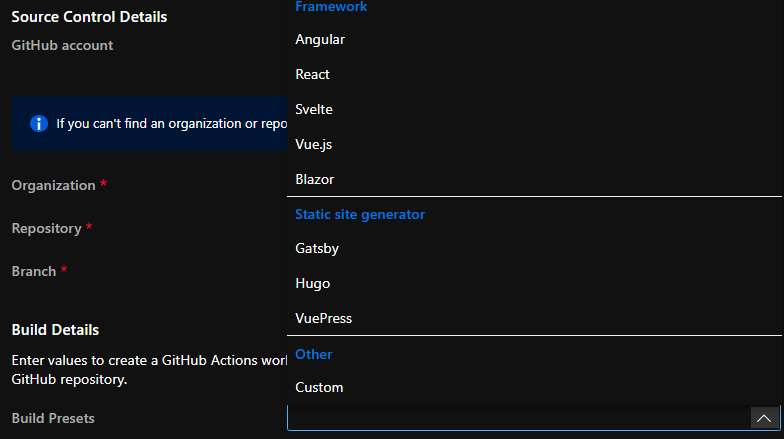
Static web apps are commonly built using libraries and frameworks like Angular, React, Svelte, Vue, or Blazor. These apps include HTML, CSS, JavaScript, and image assets that make up the application. With a traditional web server, these assets are served from a single server alongside any required API endpoints.
azure

With Static Web Apps, static assets are separated from a traditional web server and are instead served from points geographically distributed around the world. This distribution makes serving files much faster as files are physically closer to end users. In addition, API endpoints are hosted using a serverless architecture, which avoids the need for a full back-end server all together.


Key features

  • Web hosting for static content like HTML, CSS, JavaScript, and images.
  • Integrated API support provided by Azure Functions.
  • First-class GitHub integration where repository changes trigger builds and deployments.
  • Globally distributed static content, putting content closer to your users.
  • Free SSL certificates, which are automatically renewed.
  • Custom domains to provide branded customizations to your app.
  • Seamless security model with a reverse-proxy when calling APIs, which requires no CORS configuration.
  • Authentication provider integrations with Azure Active Directory, Facebook, Google, GitHub, and Twitter.
  • Customizable authorization role definition and assignments.
  • Back-end routing rules enabling full control over the content and routes you serve.
  • Generated staging versions powered by pull requests enabling preview versions of your site before publishing.

What you can do with Static Web Apps :

  • Build modern web applications with JavaScript frameworks and libraries like Angular, React, Svelte, Vue, or using Blazor to create WebAssembly applications, with an Azure Functions back-end.
  • Publish static sites with frameworks like Gatsby, Hugo, VuePress.
  • Deploy web applications with frameworks like Next.js and Nuxt.js.


Follow our first demo with a react application hosted on azure static web app .

ShareTweet
Previous Post

How To Host a React Static Website on Azure

Next Post

How To host an Angular app on Azure

Related Posts

AI

I tried GitHub Spec Kit : An Honest Field Report

June 28, 2026
411
AI

I Let Five-AI Agents Build My App. Here’s Exactly What Happened.

May 20, 2026
65
AI

GitHub Copilot Skills for Terraform: 5 On-Demand AI Assistants for Azure Container Apps

March 29, 2026
255
Azure

From Terraform to Autopilot: AI-Assisted Automation for Azure Container Apps  Part 3

March 29, 2026
1.6k
Azure

Building a Microservices Architecture on Azure Container Apps with Terraform Part 2

March 1, 2026
222
Blog

 2025 – Certifications, Community, and 50K Views

December 28, 2025
144
Next Post

How To host an Angular app on Azure

Leave a Reply Cancel reply

Your email address will not be published. Required fields are marked *

Terraform

Certifications

Microsoft certified trainer (MCT)

Recommended

I tried GitHub Spec Kit : An Honest Field Report

June 28, 2026
411
Azure Elastic Job Tutorial: Automate Your SQL Jobs Efficiently

Azure Elastic Job Tutorial: Automate Your SQL Jobs Efficiently

June 23, 2024
294
How to setup nginx reverse proxy for aspnet core apps with and without  Docker compose

How to setup nginx reverse proxy for aspnet core apps with and without Docker compose

November 23, 2022
2.2k
Sql tips and tricks

Sql tips and tricks

April 26, 2020
288
How To Send Mail Using SQL Server

How To Send Mail Using SQL Server

April 20, 2020
374
Dealing with Stuck ‘Signing Out’ Screens on Azure Windows Servers

Dealing with Stuck ‘Signing Out’ Screens on Azure Windows Servers

August 5, 2024
882
Facebook Twitter LinkedIn Youtube

I tried GitHub Spec Kit : An Honest Field Report

June 28, 2026

I Let Five-AI Agents Build My App. Here’s Exactly What Happened.

May 20, 2026

GitHub Copilot Skills for Terraform: 5 On-Demand AI Assistants for Azure Container Apps

March 29, 2026

Categories

  • AI (6)
  • Apps (1)
  • Azure (70)
  • blazor (2)
  • Blog (99)
  • c# (7)
  • Cloud (72)
  • copilot (4)
  • Courses (4)
  • Dapr (4)
  • docker (4)
  • Games (1)
  • General Tips & Fix (1)
  • Home (1)
  • Kubernetes Service (AKS) (1)
  • Motivation (3)
  • motivation (2)
  • News (9)
  • Resume (1)
  • sql (4)
  • Terrafrom (2)
  • Tricks, Tips and Fixes (4)
  • xamarin (5)
No Result
View All Result
  • Home
  • News
  • Blog
    • blazor
    • c#
    • Cloud
      • Azure
    • docker
    • sql
    • xamarin
    • Dapr
    • Tricks, Tips and Fixes
    • General Tips & Fix
  • AI
  • Cloud
  • Motivation
  • Courses
  • About
    • Resume
    • Privacy Policy