Achraf Ben Alaya
No Result
View All Result
  • Home
  • News
  • Blog
    • blazor
    • c#
    • Cloud
      • Azure
    • docker
    • sql
    • xamarin
    • Dapr
    • Tricks, Tips and Fixes
    • General Tips & Fix
  • AI
  • Cloud
  • Motivation
  • Courses
  • About
    • Resume
    • Privacy Policy
SUBSCRIBE
  • Home
  • News
  • Blog
    • blazor
    • c#
    • Cloud
      • Azure
    • docker
    • sql
    • xamarin
    • Dapr
    • Tricks, Tips and Fixes
    • General Tips & Fix
  • AI
  • Cloud
  • Motivation
  • Courses
  • About
    • Resume
    • Privacy Policy
No Result
View All Result
Achraf Ben Alaya
No Result
View All Result
ADVERTISEMENT
Home Blog Cloud Azure

How To host a Next.js app on Azure

Deploy Next.js application with Azure Static Web App Service and GitHub Actions

achraf by achraf
October 5, 2020
in Azure, Blog, Cloud
3 min read
0
0
SHARES
1.7k
VIEWS
Share on FacebookShare on Twitter

In this new blog post we are going to build a simple basic Next.js application , so you don’t have to know a lot about Next.js , all we are going to build or use is a demo project .

If you want to read more about the Azure Static Web App Service follow this link .

Creating the Next.js application

To build a next.js application we are going to use a couple of commands :

“Make sure you have a recent version of Node.js installed”

Setup :

npx create-next-app
 # or 
yarn create next-app
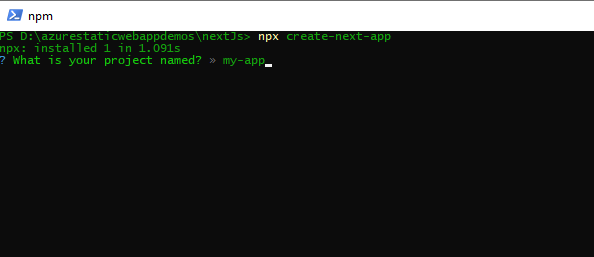
nextjs

The project will be generated automatically. Let’s go to our project using !

cd .\my-app\

You can use npm install to install missing dependencies .


To run Next.js app in development: :


npm run dev
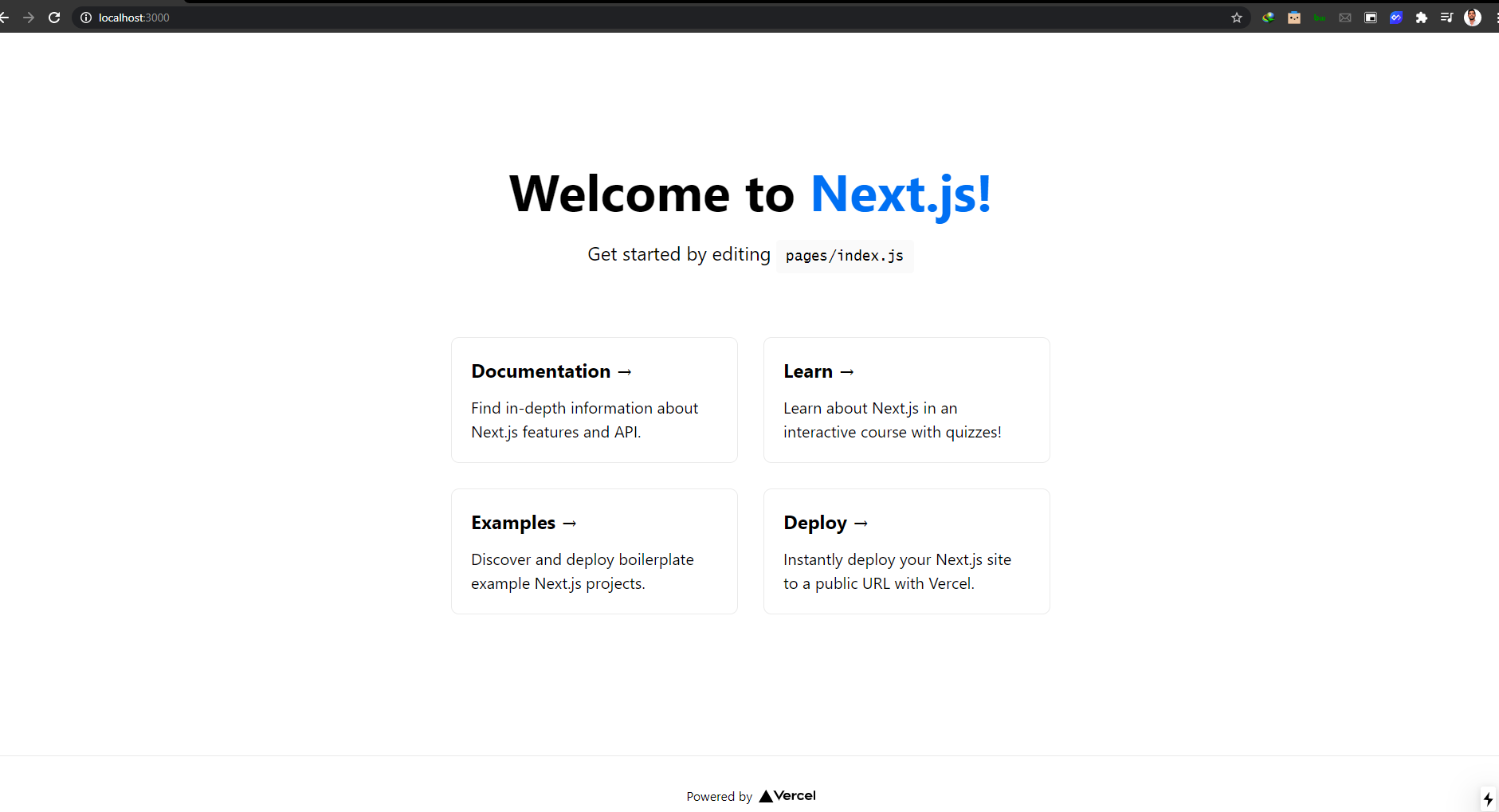
Generate a static website from Next.js build

When you build a Next.js site using npm run build, the app is built as a traditional web app, not a static site. To generate a static site, use the following application configuration.

  1. To configure static routes, create file named next.config.js at the root of your project and add the following code
module.exports = {
  exportTrailingSlash: true,
  exportPathMap: function() {
    return {
      '/': { page: '/' }
    };
  }
};

This configuration maps / to the Next.js page that is served for the / route, and that is the pages/index.js page file.

Update the package.json‘s build script to also generate a static site after building, using the next export command. The export command generates a static site.

"scripts": {
  "dev": "next dev",
  "build": "next build && next export",
},

Now with this command in place, Static Web Apps will run the build script every time you push a commit.


npm run build

Pushing code to GitHub

Now after building our project on our local computer ,we are now going to push it to GitHub .

For that we need to create a new repository :
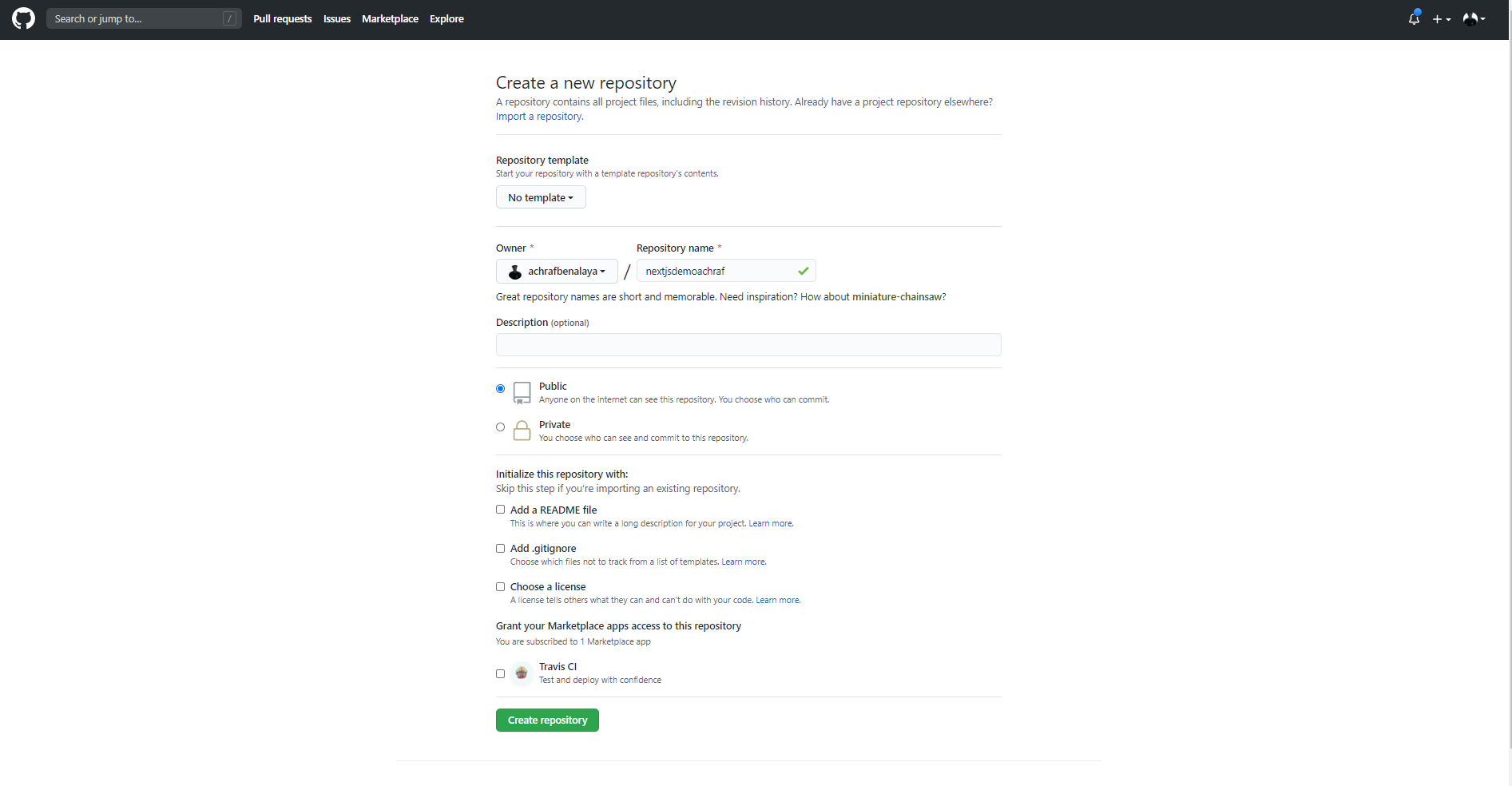
nextjs

Now to push our solution to GitHub we are going to use a couple of commands :


git add -A
 git commit -m "first commit" 
git branch -M master git remote add origin https://github.com/achrafbenalaya/nextjsdemoachraf.git
 git push -u origin master

Create Static Web App
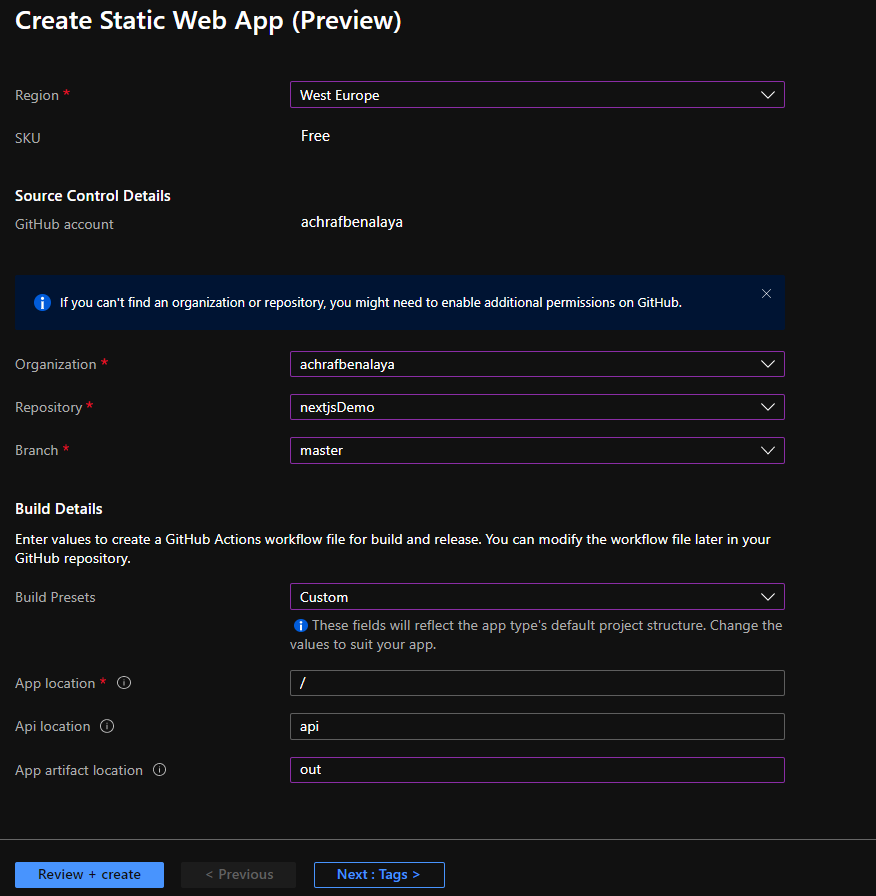
make sure to choose Custom for the build and for the App artifact write : out

After you create the app , the GitHub action will start and create a new fresh build
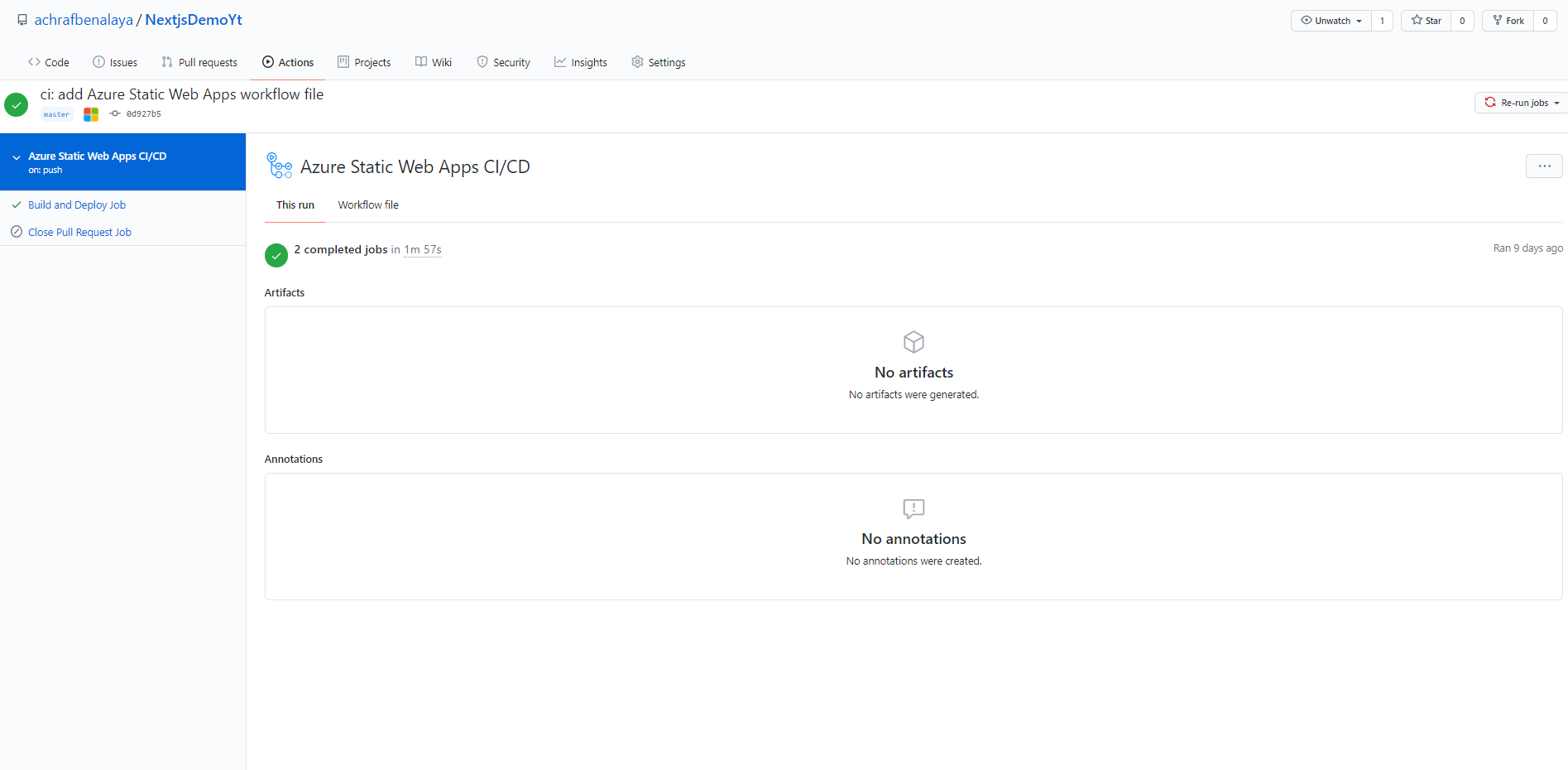
now all you have to do , pull your project since there is a new yml file that contain the build config , do not touch that file in local, choose do your modifications on your website and push again and everything will go smoothly .

Full demo in the video Below :
 

ShareTweet
Previous Post

How To host an Angular app on Azure

Next Post

coding news

Related Posts

Azure

My Fourth Year as a Microsoft MVP: From Student Partner to AI Empowerment

July 19, 2026
66
AI

I tried GitHub Spec Kit : An Honest Field Report

June 28, 2026
555
AI

I Let Five-AI Agents Build My App. Here’s Exactly What Happened.

May 20, 2026
129
AI

GitHub Copilot Skills for Terraform: 5 On-Demand AI Assistants for Azure Container Apps

March 29, 2026
411
Azure

From Terraform to Autopilot: AI-Assisted Automation for Azure Container Apps  Part 3

March 29, 2026
1.7k
Azure

Building a Microservices Architecture on Azure Container Apps with Terraform Part 2

March 1, 2026
297
Next Post
How to Claim My Free Microsoft Certification Voucher

How to Claim My Free Microsoft Certification Voucher

Leave a Reply Cancel reply

Your email address will not be published. Required fields are marked *

Terraform

Certifications

Microsoft certified trainer (MCT)

Recommended

Honored to be recognized as a Microsoft Azure MVP for 2025-2026

July 20, 2025
222
Generating report for SSL Certificates for Websites with PowerShell

Generating report for SSL Certificates for Websites with PowerShell

April 10, 2022
1.3k
PowerShell Automation for Azure Networks: Detailed VNET and Subnet Analysis

PowerShell Automation for Azure Networks: Detailed VNET and Subnet Analysis

November 2, 2024
1.1k
Empowering Companies with Azure API Center

Empowering Companies with Azure API Center

January 30, 2024
274
How to SSH into AKS Nodes

How to SSH into AKS Nodes

May 11, 2021
8k
Xamarin.forms,Blazor and Web API

Xamarin.forms,Blazor and Web API

December 3, 2020
1.4k
Facebook Twitter LinkedIn Youtube

My Fourth Year as a Microsoft MVP: From Student Partner to AI Empowerment

July 19, 2026

I tried GitHub Spec Kit : An Honest Field Report

June 28, 2026

I Let Five-AI Agents Build My App. Here’s Exactly What Happened.

May 20, 2026

Categories

  • AI (6)
  • Apps (1)
  • Azure (71)
  • blazor (2)
  • Blog (100)
  • c# (7)
  • Cloud (72)
  • copilot (4)
  • Courses (7)
  • Dapr (4)
  • docker (4)
  • Games (1)
  • General Tips & Fix (1)
  • Home (1)
  • Kubernetes Service (AKS) (1)
  • Motivation (3)
  • motivation (2)
  • News (9)
  • Resume (1)
  • sql (4)
  • Terrafrom (2)
  • Tricks, Tips and Fixes (4)
  • xamarin (5)
No Result
View All Result
  • Home
  • News
  • Blog
    • blazor
    • c#
    • Cloud
      • Azure
    • docker
    • sql
    • xamarin
    • Dapr
    • Tricks, Tips and Fixes
    • General Tips & Fix
  • AI
  • Cloud
  • Motivation
  • Courses
  • About
    • Resume
    • Privacy Policy

ADVERTISEMENT